{success} This Feature only available in Webworks Co FullyLoaded
Twilio SMS Integration (FullyLoaded)
Webworks Co FullyLoaded integrates with Twilio to deliver automated SMS notifications—keep attendees informed, engaged, and on time for every event.
- Automated SMS Notifications:
- Send booking confirmations, reminders, and updates via SMS
- Trigger messages for event changes or last-minute alerts
- Attendee Engagement:
- Reach attendees instantly, even without email access
- Improve show-up rates and attendee satisfaction
- Personalization & Segmentation:
- Customize messages for different attendee groups
- Combine with promo codes and marketing campaigns
To enable Twilio SMS notifications, first create a Twilio Merchant Account at Twilio. After setting up your account, copy your Twilio Sid, Twilio Auth Token, and Twilio Number.
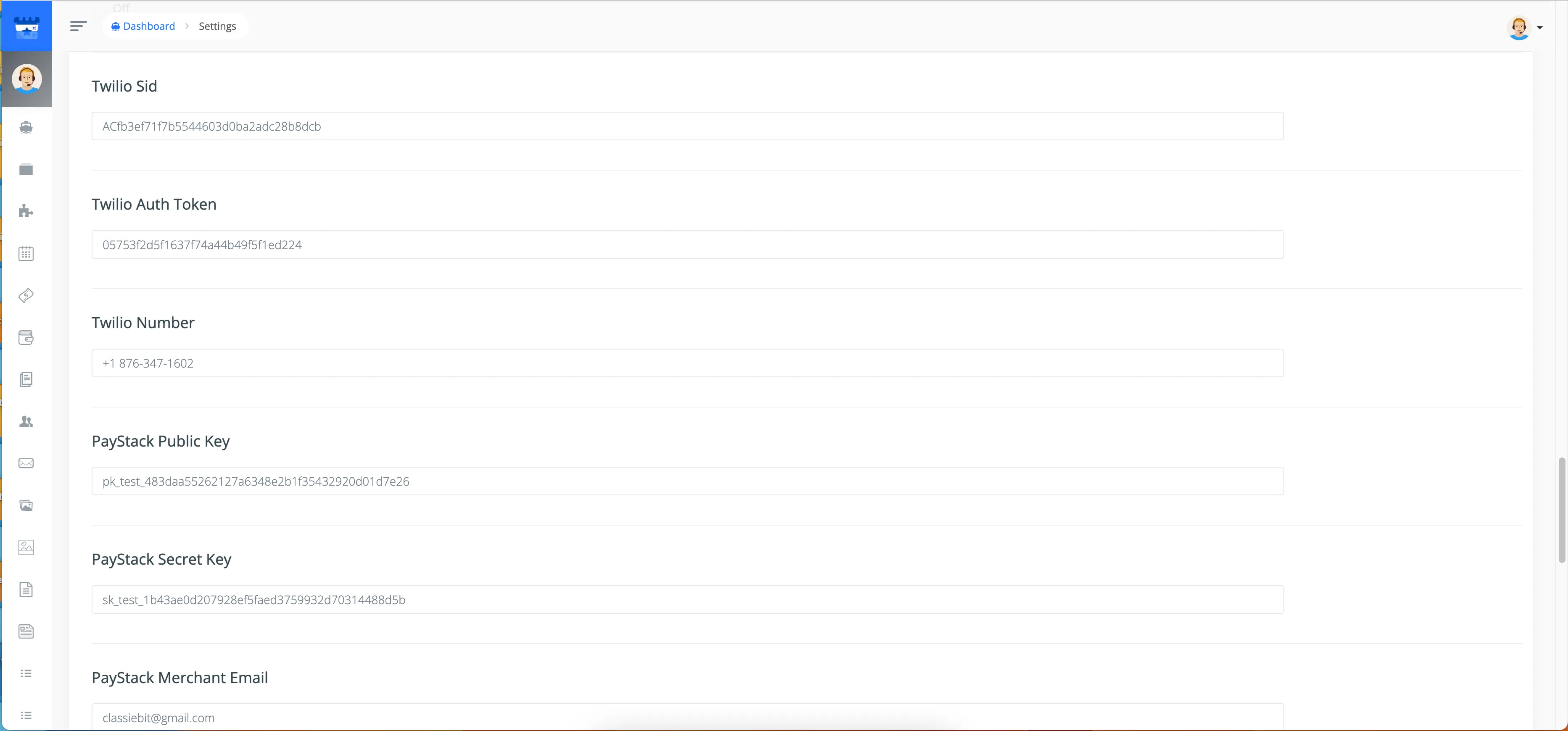
- Go to Admin Panel -> Settings -> Apps
- Enter your
Twilio Sid,Twilio Auth Token, andTwilio Numberand click Save Settings
{primary} To disable Twilio SMS, simply remove the Twilio keys from your settings.