{success} This Feature only available in Webworks Co FullyLoaded
Razorpay (India) Payments for Webworks Co FullyLoaded
Why It Matters
Webworks Co FullyLoaded integrates with Razorpay—accept payments in India, support local payment methods and currencies, and expand your reach to one of the world's fastest-growing event markets.
Indian Payment Gateway:
- Accept payments from anywhere in India
- Support for local payment methods and Indian currencies
- No currency conversion fees or international payment delays
Seamless Checkout:
- Fast, secure, and mobile-friendly payment flows
- Reduce barriers for Indian attendees
- Support for UPI, cards, and digital wallets
Reporting & Settlement:
- Track payments and settlements in real time
- Export data for accounting and compliance
- Automatic conversion to your preferred currency
Enable Razorpay to accept secure online payments in your Webworks Co FullyLoaded event management platform. Razorpay is a leading payment solution for businesses in India, supporting both test and live transactions.
To start accepting Razorpay payments, first create a Razorpay Business Account at Razorpay Business. After setting up your account, copy your Razorpay API credentials.
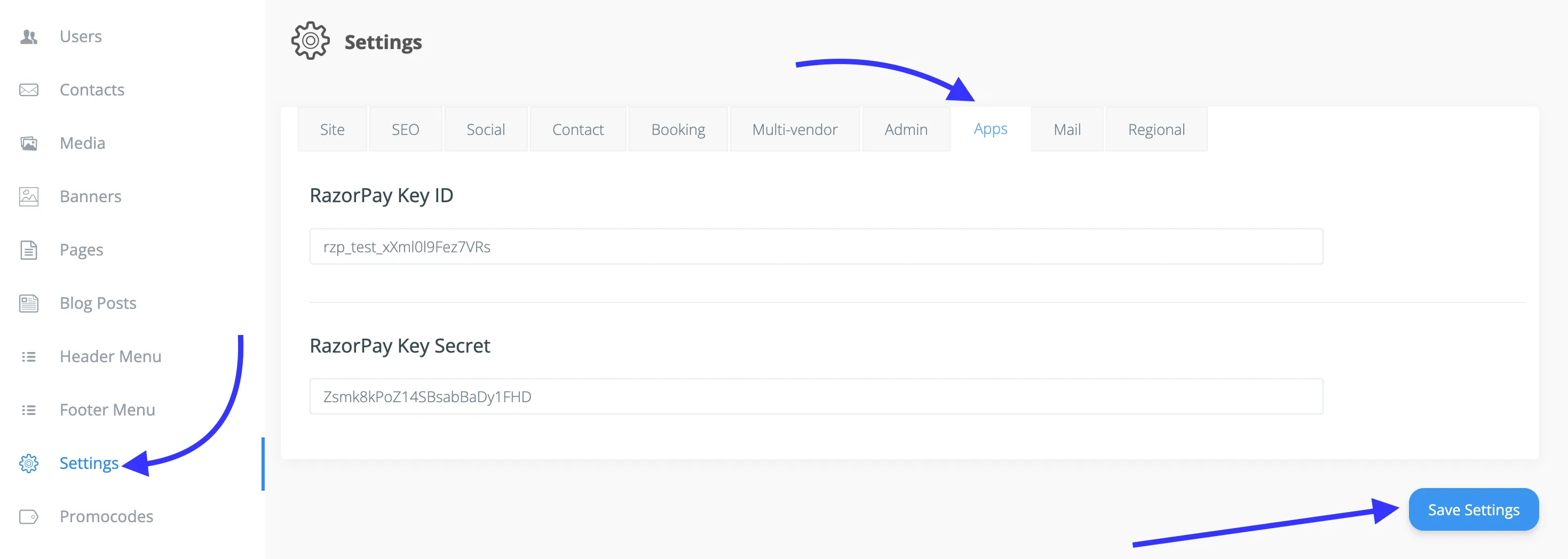
- Go to Admin Panel -> Settings -> Apps
- Enter the following Razorpay API credentials:
RazorPay Key IDRazorPay Key Secret
You can use Razorpay Test keys to try payments and Razorpay Live keys to accept real payments from customers.
{primary} To disable Razorpay, simply remove all the Razorpay keys from your settings.