Taxes & Fees Management
Effectively managing taxes and service fees is essential for event organizers, platforms, and marketplaces to ensure compliance, transparency, and optimal revenue. Webworks Co & FullyLoaded provides a robust, flexible tax system that supports a wide range of business models—from simple VAT to complex multi-fee structures for global event platforms.
{primary} Access Taxes: Go to
Admin Panel → Taxesto add, edit, or manage all tax and fee settings.
- Overview: Why Taxes Matter
- Add New Tax
- Tax Configuration Options
- Business Use Cases & Best Practices
- Admin Taxes vs. Organizer Taxes
- FAQs & Tips
Overview: Why Taxes Matter
- Legal Compliance: Meet local, national, and international tax regulations (e.g., VAT, GST, sales tax).
- Transparency: Clearly display all fees and taxes to customers for trust and conversion.
- Revenue Optimization: Add service fees, platform charges, or surcharges to boost platform revenue.
- Flexibility: Support multiple tax types for different event categories, regions, or business models.
{success} Industry Standard: Leading event platforms (Eventbrite, Ticketmaster, Universe) use similar tax and fee systems to maximize compliance and revenue.
Add New Tax
Create custom taxes or fees to match your business needs. Taxes can be applied as a percentage or fixed amount, and can be configured for different pricing strategies.
{primary} Click
Add New in the Admin Panel to create a new tax or fee.
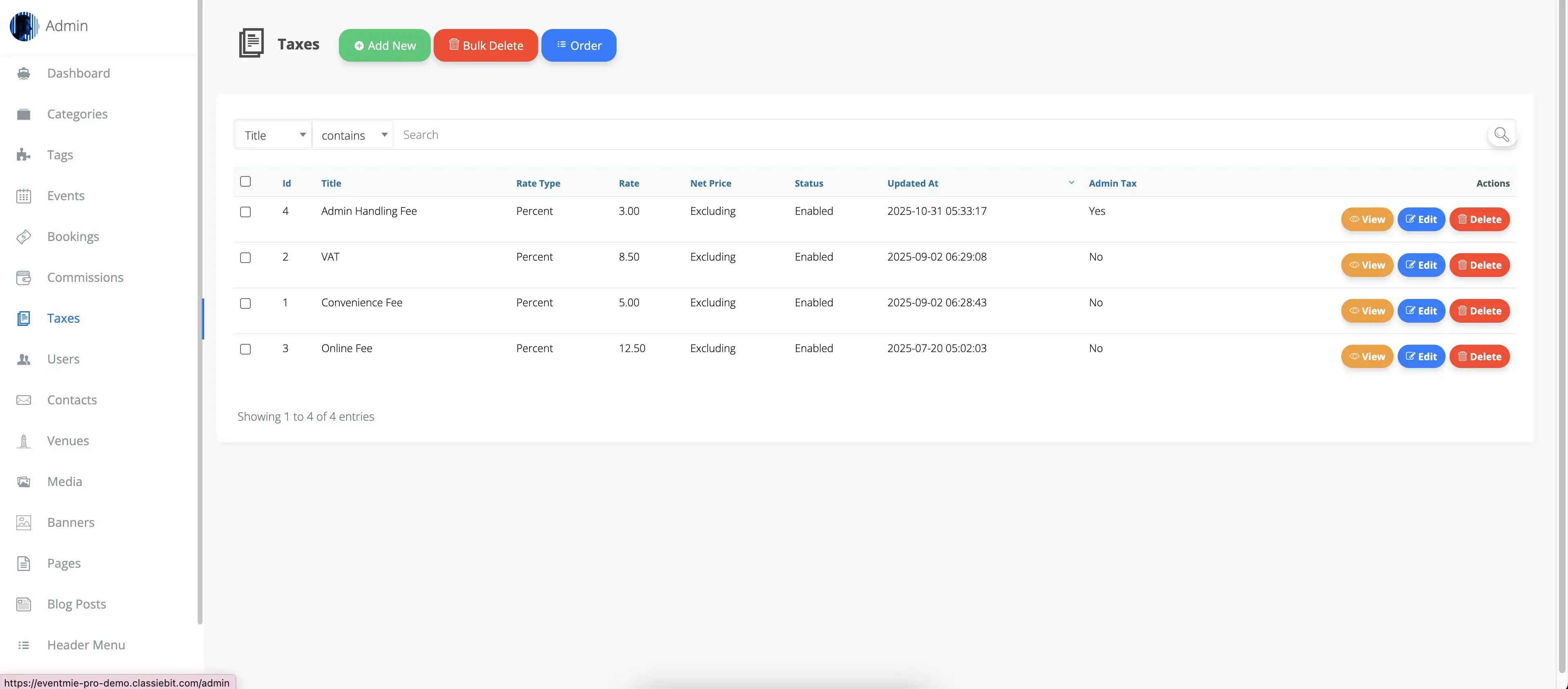
Tax Configuration Options Explained
- Tax Title: Name of the tax or fee (e.g., VAT, Service Fee, City Tax, Platform Fee).
- Rate Type:
- Percent: Tax is calculated as a percentage of the ticket price (e.g., 10% VAT).
- Fixed: Tax is a fixed amount per ticket (e.g., $2 service fee per ticket).
- Net-Price:
- Excluding: Tax is added on top of the ticket price (ticket price + tax). Most common for VAT, sales tax, and service fees.
- Including: Tax is included in the ticket price and only shown for transparency. Useful for all-inclusive pricing or regions where tax-inclusive pricing is required.
- Status:
- Enabled: Tax is active and available for use.
- Disabled: Tax is inactive and cannot be selected or applied.
- Admin Tax:
- No: Tax can be selected by organizers for their event tickets.
- Yes: Tax is automatically applied to all tickets and cannot be deselected by organizers. Used for platform-wide fees or mandatory taxes.
Business Use Cases & Best Practices
1. Standard Sales Tax / VAT / GST
- Apply a percentage-based tax (e.g., 10% VAT) to comply with government regulations.
- Use "Excluding" net-price for transparent, itemized receipts.
2. Service Fees & Platform Charges
- Add a fixed or percentage-based service fee to every ticket (e.g., $2 per ticket or 5% platform fee).
- Use Admin Tax to ensure the fee is always applied and revenue goes directly to the platform.
3. Regional or City Taxes
- Create multiple taxes for different regions, cities, or event types (e.g., city tax, entertainment tax).
- Organizers can select relevant taxes for their events.
4. All-Inclusive Pricing
- Use "Including" net-price to show tax as part of the ticket price for markets where this is required (e.g., Europe, Asia).
- Display tax breakdown for transparency.
5. Multi-Tax Scenarios
- Combine VAT, service fees, and surcharges for complex pricing models.
- Organizers can apply multiple taxes to a single ticket for full compliance.
{info} Best Practice: Always consult with a tax advisor or accountant to ensure your configuration meets local laws and maximizes revenue.
Admin Taxes vs. Organizer Taxes
- Admin Taxes:
- Created and managed by the Admin (site owner).
- Automatically applied to all tickets (invisible to organizers).
- Used for platform fees, mandatory service charges, or regulatory taxes.
- Revenue from Admin Taxes goes directly to the Admin and is not included in organizer commissions.
- Organizer Taxes:
- Created by Admin, selectable by organizers for their events.
- Organizers can apply one or more taxes to each ticket for flexible, event-specific pricing.
- Revenue from Organizer Taxes is included in the event's total and may be subject to commission.
{primary} Tip: Use Admin Taxes for consistent platform revenue and compliance. Use Organizer Taxes for event-specific needs and regional flexibility.
FAQs & Tips
Q: Can I apply both Admin and Organizer taxes to the same ticket?
- Yes. Admin Taxes are always applied, and organizers can add additional taxes as needed.
Q: How are taxes displayed to customers?
- Taxes are itemized at checkout and on receipts for full transparency, matching industry best practices.
Q: Can I use taxes for surcharges or non-tax fees?
- Absolutely. Use the tax system to add any mandatory or optional fee (e.g., handling, insurance, donation, etc.).
Q: How do I ensure compliance in different countries?
- Create separate taxes for each region and use the "Including" or "Excluding" option as required by law.
{success} Pro Tip: Regularly review your tax and fee setup to stay compliant and maximize platform revenue. Leading event platforms update their tax policies frequently to adapt to new regulations and business models.